
Remote Learning
At Bidston Avenue Primary School, we believe that children learn best when they are in school, learning alongside their friends and supported by their teachers. Regular attendance is essential for children’s learning, wellbeing and wider development.
However, there may be exceptional circumstances when remote learning is needed, such as severe weather, school closures or situations where individual pupils are unable to attend school.
In these circumstances, we aim to provide meaningful, accessible and age-appropriate learning that helps children continue developing their knowledge, understanding and skills. Our approach reflects our school curriculum and our commitment to helping every child become a Reader, a Thinker and Resilient.
Wherever possible, remote learning will follow the curriculum being taught in school, using familiar online resources and activities. This will include phonics and reading, writing, mathematics and learning across other curriculum subjects. Activities will be adapted to reflect children’s ages and individual needs, including those with special educational needs and disabilities (SEND).
We recognise that families have different circumstances, particularly when it comes to access to technology, time and space for learning. We will work with parents and carers to provide practical support and alternative arrangements where needed.
Remote learning is not a replacement for attending school, but it helps children maintain their learning when attendance is not possible in exceptional circumstances.
This page explains how remote learning works at Bidston Avenue, what families can expect and where to find additional resources and support.
Accessing Learning From Home
When remote learning is required, daily activities will be posted by teachers to the following sites by 9.00 am. The activities teachers choose are designed to best meet the needs of our children and may look different to what other schools may offer.
Children in Nursery & FS2 will find home learning activities posted to Tapestry, which should last around 3 hours each day.
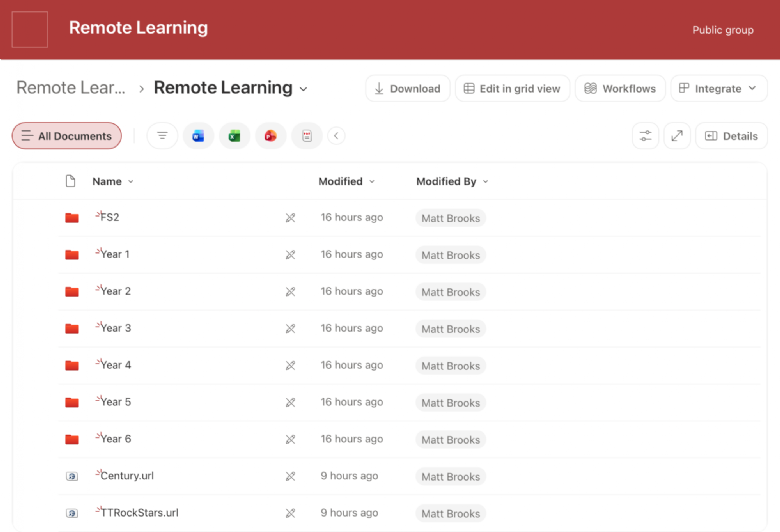
Children from Y1-6 will find home learning activities posted to our remote learning site, which should last around 3 hours for Y1-2 and four hours for Y3-6.
|
|
|
| Nursery & FS2 Activities | Years 1-6 Activities |

In addition, children can continue to access the following sites that they use in school. These sites provide a variety of learning activities that can be tailored to meet children's learning needs and activities and challenges set by teachers.
|
|
|
|



Helping Your Child Learn Best
-
Try to create a space for your child to work that is as free from distractions as possible and where they have access to equipment they need such as paper, pens and pencils.
-
Establish a daily routine that includes regular breaks. We understand that this may look different for each family and so teachers will share activities by 9.00am, which can be completed at some point that day.
-
Children learn in different ways. For some, breaking activities down into smaller chunks or breaking the time spent on activities into shorter blocks and taking regular breaks may be best. Use a timer to help with this and encourage children to take regular movement breaks.
-
Be patient! Remote learning is very different to learning in the classroom. Encourage your child to try their best with the activities set by their teacher and reach out to their class teacher if they are struggling.
-
Remote learning activities are designed by class teachers to be tailored to their class' needs. For children with SEND, activities may need to be adapted further to help them learn best or alternative work provided by their class teacher. If a child has a learning plan or EHCP, parents should use the strategies contained in them to help their children learn best. Contact your child's class teacher (via the school office) if you need more help.
- If you have further concerns about your child's learning or wellbeing, contact Mrs Hackett (our Designated Safeguarding Lead) or Miss Butterworth (the school's SENDCO) via the school office.
Staying Safe Online
To help your child stay safe online:
- Make sure that any devices that connect to the internet are used in family areas where you can keep an eye on the websites that are being accessed and apps/games being used.
- Set up filters provided by your internet provider or on the consoles and devices that your child uses. These can help to prevent children from accessing inappropriate content.
- Talk to your child about the apps, games and websites they use.
- Decide together on what is an appropriate amount of time that they should be using their devices for and make sure that they stick to this. Remote learning activities set by teachers will include a balance of screen-based and unplugged/offline activities.
- Encourage them to play/have interests away from their devices.
- If you have any concerns about your child's online behaviour, contact their class teacher or Mrs Hackett (our Designated Safeguarding Lead) via the school office.
How School Can Help
- Paper-based activities are available for children who do not have access to the internet at home. Please contact the school office if you would like one of these packs.
- In the event of remote learning being required, families may be able to loan out school devices to help children access online activities. Contact the school office for more information.
- If you have any concerns about your child's learning, please contact their class teacher via the school office.